| Author: Ashish Kumar | Published: 26-May-2026 |
Why Pune Businesses Are Rethinking Their On-Premise Infrastructure
Pune has quietly become one of India’s most active technology hubs. With a dense concentration of manufacturing companies, IT firms, financial services providers, and mid-size enterprises, the city is at a critical turning point. As one real-world example shows – SBI Factors successfully migrated from Oracle to MySQL with the right cloud migration service provider, cutting costs and future-proofing their data infrastructure. Thousands of businesses in Pune still run on physical, on-premise servers, but the pressure to modernise is real and growing.
If your company keeps servers in a back office or an owned data centre, you already know the pain points. Hardware that needs replacing every 3 to 5 years. IT teams spending weekends on maintenance. Disaster recovery plans that exist mostly on paper. Scaling that requires procurement cycles that take months.
The shift to cloud migration services is not just a technology decision anymore. It is a business decision that affects agility, cost structure, and competitive standing. This guide is written for decision makers in Pune who want a clear, honest understanding of what moving from on-premise to cloud actually involves, what it costs, what it saves, and how to do it without disrupting operations.
By the numbers: Cloud migration drives an average 20% to 30% reduction in infrastructure costs. By 2026, over 60% of all enterprise workloads are expected to run fully in the cloud. The global cloud migration services market, valued at USD 21.66 billion in 2025, is projected to reach USD 234 billion by 2035.
What Does On-Premise to Cloud Migration Actually Mean?
On-premise (on-prem) infrastructure refers to servers, storage, networking equipment, and software that a company owns, hosts, and manages at its own physical location. You pay for hardware upfront, hire staff to maintain it, and take full responsibility for uptime, security, and capacity.
Cloud migration is the process of moving those workloads, data, applications, and processes from your own infrastructure to a cloud provider’s environment, such as Amazon Web Services (AWS), Microsoft Azure, or Google Cloud Platform (GCP). Instead of owning hardware, you pay for what you use, and the provider handles the physical infrastructure.ing and features before choosing.
The Six Migration Strategies (The 6 Rs)
When cloud migration consulting companies plan a move, they typically evaluate six approaches:
| Strategy | Also Called | What It Means |
| Rehost | Lift & Shift | Move the application as-is to the cloud. Fastest, lowest complexity. Most common first step. |
| Replatform | Move & Improve | Minor optimisations while moving. For example, switching from a self-managed database to a managed cloud database. |
| Repurchase | Drop & Shop | Replace an existing application with a SaaS alternative (e.g. moving from on-prem CRM to Salesforce). |
| Refactor / Re-architect | Cloud Modernisation | Redesign the application to be cloud-native. Highest ROI long-term but requires the most effort. |
| Retain | Revisit Later | Keep certain workloads on-premise for now, especially compliance-sensitive systems. |
| Retire | Decommission | Identify and shut down legacy systems that are no longer needed. |
The Real Reasons Companies in Pune Are Moving to the Cloud Right Now
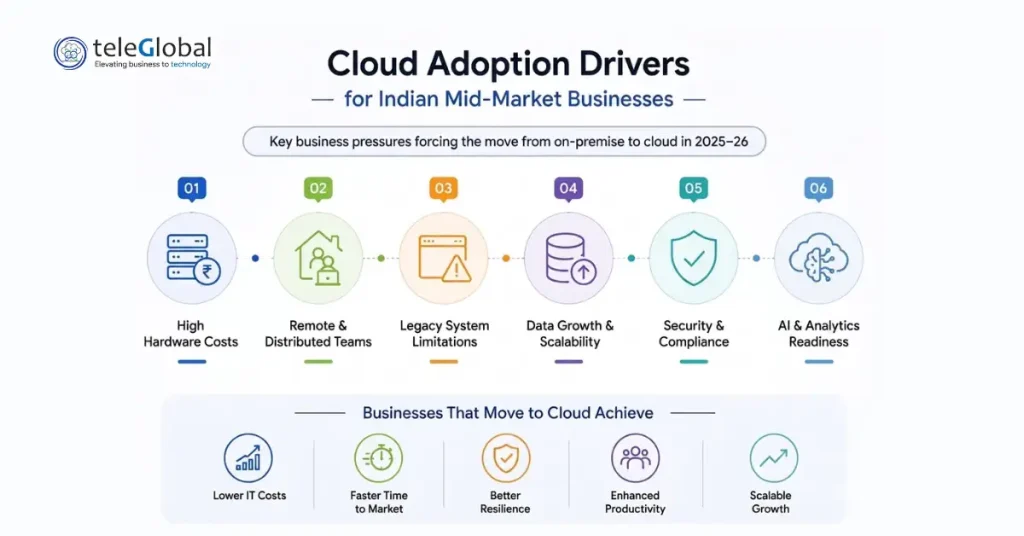
1. Hardware refreshes are getting expensive – a typical server refresh cycle costs 15% to 25% of annual IT budget. In a cloud model, that capital expenditure disappears. You move to operational expenditure, which is predictable and scalable.
2. Remote work and distributed teams – post-2020, companies realised that on-premise systems create bottlenecks for employees working from different locations. Cloud environments provide seamless access from anywhere without VPN headaches.
3. Legacy system limitations are becoming a real blocker – 45% of companies cite legacy system constraints as their main driver for cloud adoption, according to industry surveys. Older ERP systems, databases, and custom applications that were built for on-prem can now be replaced or extended in the cloud.
4. Data growth outpacing storage capacity – on-prem storage has hard limits. Cloud storage scales automatically. By 2025, approximately 62% of business data is already stored in cloud environments.
5. Security compliance requirements – industries like BFSI, healthcare, and manufacturing in Pune face increasingly strict data protection requirements. Cloud platforms from providers like AWS and Microsoft Azure offer compliance certifications (ISO 27001, SOC 2, GDPR readiness) that would be expensive to implement on private infrastructure.
6. AI and analytics readiness – cloud platforms provide native access to machine learning tools, data lakes, and analytics services. Companies that want to leverage AI need cloud-scale compute. Cloud modernisation is, in many ways, the prerequisite for AI adoption.
Choosing the Right Cloud Platform: Azure, AWS, or GCP?
This is the question most IT teams in Pune spend weeks on. The honest answer is that the right platform depends on your existing technology stack, vendor relationships, compliance requirements, and workload type. Here is a practical comparison:
| Factor | Microsoft Azure | Amazon AWS | Google Cloud (GCP) |
| Best For | Microsoft shops, hybrid workloads, enterprise ERP | Startups, e-commerce, broad service range | Data analytics, machine learning, AI-heavy workloads |
| Windows Workloads | Best-in-class | Good | Limited |
| Migration Tools | Azure Migrate, Azure Data Migration Service | AWS Migration Hub, AWS DMS | Migrate for Compute Engine |
| Hybrid Cloud | Azure Arc (excellent) | AWS Outposts | Anthos |
| India Data Centres | Mumbai, Pune region | Mumbai, Hyderabad | Mumbai, Delhi |
| Pricing Model | Pay-as-you-go, Reserved Instances | On-demand, Savings Plans | Sustained-use discounts |
Azure Migration Services for Pune Businesses
Microsoft Azure is the most commonly chosen platform for businesses in Pune that already use Windows Server, SQL Server, or Microsoft 365. The azure migration assessment process, done through the Azure Migrate tool, scans your on-premise environment and produces a readiness report, sizing recommendations, and a projected monthly cost. This assessment is free and typically takes one to two weeks to complete with a qualified partner.
For database migrations, the Azure Data Migration Service handles the heavy lifting of moving SQL databases, Oracle workloads, and other data stores to Azure SQL or Azure Database for PostgreSQL with minimal downtime. For companies considering AWS to Azure migration or other cross-platform moves, this is where having an experienced team matters. Cloud to cloud migration carries its own complexity around schema compatibility, IAM roles, and network configuration that is easy to underestimate.
Teleglobal’s Microsoft Azure Services page covers the specific Azure services and migration pathways that work best depending on your workload type. yearly.
How the Migration Process Actually Works: Step by Step
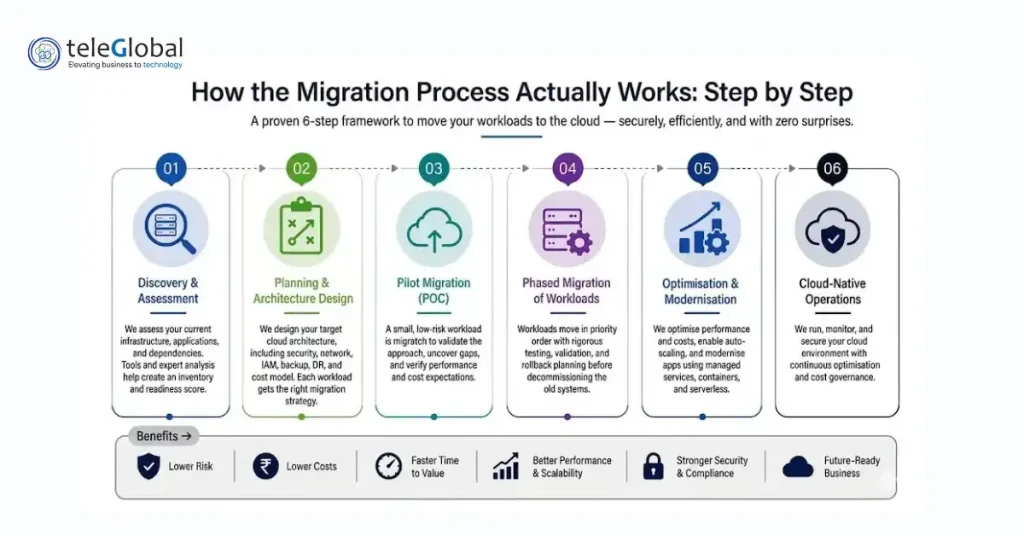
Most experienced migration teams follow a structured framework. Before diving in, it is worth reading Teleglobal’s detailed Cloud Migration Strategy guide – it covers how to evaluate your readiness, pick the right approach, and sequence workloads for minimum risk. What follows here is the practical, step-by-step version of how a professional migration is run:
Step 1: Discovery and Assessment
Before anything moves, your existing environment is mapped. What servers do you have? What applications run on them? What are the dependencies between systems? What data classification applies to your stored information? An assessment typically uses tools like AWS Migration Hub, Azure Migrate, or third-party tools to produce an inventory and readiness score. This is where a cloud migration consulting company adds the most value, translating the technical inventory into a business-aligned migration plan.
Step 2: Planning and Architecture Design
Based on the assessment, the migration team designs the target cloud architecture. This includes network topology (VPCs, subnets, security groups), identity and access management (IAM) design, backup and disaster recovery setup, and cost modelling. The plan assigns a migration strategy (rehost, replatform, refactor) to each workload.
Step 3: Pilot Migration (Proof of Concept)
A small, low-risk workload is moved first. This proves out the process, identifies any issues in the plan, and gives your team experience before the critical systems move. It also validates cost projections against real-world consumption.
Step 4: Phased Migration of Workloads
Workloads migrate in priority order, usually starting with non-critical systems, then internal applications, then customer-facing services. Each migration includes testing, rollback planning, and validation before the old system is decommissioned.
Step 5: Optimisation and Modernisation
Once workloads are running in the cloud, the real work of cloud modernisation begins. Right-sizing compute instances, enabling auto-scaling, implementing cost alerts, and incrementally refactoring applications to use managed services (serverless, managed databases, containerisation) all happen in this phase. This is what cloud application modernisation looks like in practice.
Step 6: Cloud-Native Operations
Post-migration, the focus shifts to managed operations: monitoring, security posture management, cost governance, and continuous improvement. Many businesses in Pune partner with a Cloud Managed Services provider at this stage so that internal teams can focus on business outcomes rather than infrastructure maintenance.
What Goes Wrong in Cloud Migrations (and How to Avoid It)
Understanding where migrations fail is more useful than reading success stories. Here are the honest challenges, along with practical solutions:
| Common Challenge | What to Do About It |
| Unexpected cloud costs in the first 3 months | Run a detailed cost model before migration. Use reserved instances or savings plans. Set budget alerts on Day 1. Work with a partner who does FinOps. |
| Migrating without a full dependency map | Always run a discovery assessment tool (Azure Migrate, AWS Migration Hub) before planning. Hidden dependencies between applications are the most common cause of post-migration failures. |
| Data loss or corruption during migration | Never cut over production workloads without a validated backup. Run parallel environments during migration with a defined rollback plan. |
| Security gaps in the new cloud environment | Apply the principle of least privilege to all IAM roles. Enable cloud security posture management (CSPM) from Day 1. See Teleglobal’s Cloud Security Services for structured guidance. |
| Poor application performance post-migration | Right-size instances based on actual utilisation, not theoretical peak load. Use cloud-native load balancers and CDNs for customer-facing applications. |
| Lack of internal cloud skills | Invest in training or partner with an experienced cloud migration consulting company. Skilling gaps are the #1 cause of stalled migrations. |
How Teleglobal Approaches Cloud Migration and Modernisation
Teleglobal International has been working with businesses across India for over a decade, helping them move away from on-premise infrastructure toward scalable, secure cloud environments. Trusted by over 900 companies, the team brings certified expertise across AWS, Microsoft Azure, and Google Cloud Platform to every engagement. If you are looking to hire cloud migration experts who understand both the technical and business side of the move, this is the kind of depth that makes the difference.
What makes the approach different from a generic IT services firm is depth. Teleglobal does not just move workloads. The team conducts a structured cloud consulting engagement first, mapping business goals to technical execution before a single server is touched. This prevents the expensive course corrections that happen when migrations are rushed.
Services Relevant to On-Premise to Cloud Migration
- Cloud Migration and Modernisation Services: End-to-end migration planning and execution covering all six migration strategies, across AWS, Azure, and GCP.
- IT Infrastructure Management: For organisations that need experienced hands managing their infrastructure through the transition period.
- Application Modernisation: Once in the cloud, the real value comes from application modernisation and database management. Teleglobal helps refactor monolithic applications into microservices and containerised architectures.
- DevOps Services: Cloud migrations that don’t include a DevOps transformation often leave efficiency gains on the table. CI/CD pipelines, infrastructure as code, and automated testing are part of a complete modernisation.
- Cloud Security: Security is not an afterthought. Cloud security services include identity management, data encryption, threat detection, and compliance auditing from the very start of migration.
- Multi-Cloud Pricing Calculator: Before committing to a platform, use Teleglobal’s multi-cloud pricing calculator to compare real-time costs across AWS, Azure, and GCP for your specific workload profile.
What Does Cloud Migration Cost? And What Do You Save?
Cost is the first question most businesses ask, and it deserves an honest answer. For a detailed breakdown of how to estimate your specific spend before committing, read Teleglobal’s guide to calculating cloud migration costs, it covers assessment, strategy, and cost savings with real numbers.
Calculating cloud migration costs? Get expert guidance and a smooth migration. Assessment, strategy, and cost savings with Teleglobal’s proven approach. Start here.
The table below gives a practical range for businesses of different sizes:
| Cost Factor | Typical Range |
| Migration assessment (small to mid-size business) | Included in most partner engagements or Rs. 50,000 to Rs. 2,00,000 |
| Full migration project (SME, 10-50 servers) | Rs. 8,00,000 to Rs. 40,00,000 depending on complexity |
| Ongoing cloud infrastructure (post-migration) | Typically 20-40% lower than equivalent on-premise CAPEX over 3 years |
| Cloud managed services | Variable; often replaces 1-2 FTE infrastructure roles |
| Avoided hardware refresh cost | Rs. 15,00,000 to Rs. 75,00,000+ per refresh cycle |
The Right Time to Move is Before You Are Forced To
The businesses in Pune that moved to cloud two or three years ago have a compounding advantage today. Their infrastructure scales without procurement delays, their teams focus on products instead of maintenance, and they can experiment with AI and analytics without significant additional investment.
Moving from on-premise to cloud is not a one-time event. It is a continuous process of modernisation that starts with getting your workloads off aging hardware and evolves into a fully cloud-native operation over time. The key is to start with a proper assessment, plan each phase, and work with a team that has done this enough times to know where the hidden risks are.
For any business in Pune with physical servers that are more than four years old, or with a hardware refresh coming up in the next 12 months, now is the right time to evaluate whether that capital expenditure makes sense, or whether it should become your last on-premise investment.
Frequently Asked Questions
1. How long does an on-premise to cloud migration take?
It depends on the size and complexity of your environment. A small business with 5 to 10 servers can complete a migration in 6 to 12 weeks. A mid-size company with 50+ servers, legacy ERP systems, and compliance requirements typically takes 4 to 9 months. The assessment phase at the beginning is what determines an accurate timeline. Average migration timelines have decreased by 27% since 2022 due to better automation and AI-assisted tools.
2. Will we experience downtime during migration?
A well-planned migration is designed for minimal or zero downtime on critical systems. Techniques like parallel running (running old and new environments simultaneously), live database replication, and cutover windows during off-peak hours mean most migrations are invisible to end users. The pilot migration phase tests your cutover process before the critical systems move.
3. Is cloud actually more secure than on-premise?
Major cloud providers like AWS and Microsoft Azure invest billions annually in security infrastructure, far more than any single company can maintain on-premise. They hold certifications like ISO 27001, SOC 2, and PCI-DSS. That said, cloud security follows a shared responsibility model: the provider secures the infrastructure, but you are responsible for securing your data, access controls, and application configuration. Working with a cloud security specialist ensures this shared responsibility is properly managed.
4. What is cloud modernisation and do we need it?
Cloud modernisation is the process of re-architecting or refactoring applications to take advantage of cloud-native capabilities: managed databases, auto-scaling, serverless computing, containers, and microservices. You do not need to modernise everything immediately. Most businesses start with a lift-and-shift migration to get out of aging hardware, then gradually modernise workloads based on business value. Applications that are refactored deliver 40% higher ROI than those that are simply moved as-is.
5. Should we use Azure, AWS, or a multi-cloud setup?
For businesses already using Microsoft 365 or Windows Server, Azure migration services usually provide the smoothest path. AWS is often preferred for web applications, e-commerce, and DevOps-centric teams. A multi-cloud approach works well when you want to avoid vendor lock-in or when different workloads are better suited to different platforms. More than half of large organisations now deliberately distribute workloads across multiple cloud providers for resilience and cost optimisation.
6. What is an azure migration assessment and is it worth doing?
An azure migration assessment uses the Azure Migrate tool to scan your on-premise environment and produce a readiness report. It identifies which workloads are ready to move to Azure, which need remediation first, estimates monthly cloud costs, and recommends VM sizes. It is free when done through a Microsoft partner and typically takes 1 to 2 weeks. Yes, it is worth doing before any decision is made. Assessments prevent costly surprises.