| Author: Kamlesh Kumar | Published: 11-June-2026 |
A vector database stores data as high-dimensional numerical representations called embeddings and retrieves results based on meaning and context rather than exact keyword matches. It is the infrastructure layer that makes AI applications — from chatbots to recommendation engines — accurate, fast, and scalable. Every time an AI assistant gives you a relevant answer, a vector database retrieved the right context in milliseconds.
For businesses building or evaluating AI systems in 2026, understanding vector databases is no longer optional. A vector DB sits at the core of every modern AI stack, from RAG pipelines to recommendation engines. The global market for vector databases is projected to grow from USD $2.58 billion in 2025 to USD $17.91 billion by 2034, according to Fortune Business Insights — a 24% compound annual growth rate. Gartner further forecasts that vector databases will lead all database categories in growth at a 75.3% CAGR, driven by generative AI and retrieval-augmented generation (RAG) deployments.
What Is a Vector Database?
A vector database is a specialized storage system designed to hold, index, and retrieve high-dimensional vector embeddings generated by machine learning models. Unlike a SQL database that stores names, numbers, and dates in rows and columns, a vector database stores numerical arrays that represent the semantic meaning of data — whether that data is a sentence, an image, an audio clip, or a product description.
These numerical arrays are called embeddings. When an embedding model processes the sentence ‘What payment methods do you accept?’ it produces a vector of hundreds or thousands of floating-point numbers. Another sentence like ‘Which cards can I use to pay?’ produces a different vector but one that sits very close to the first in mathematical space. A vector database finds these close neighbors through a method called similarity search, returning results that are semantically related even when the exact words differ.
This capability is what separates vector databases from every other storage system and makes them the foundation of modern AI applications.
How a Vector Database Works: Step by Step
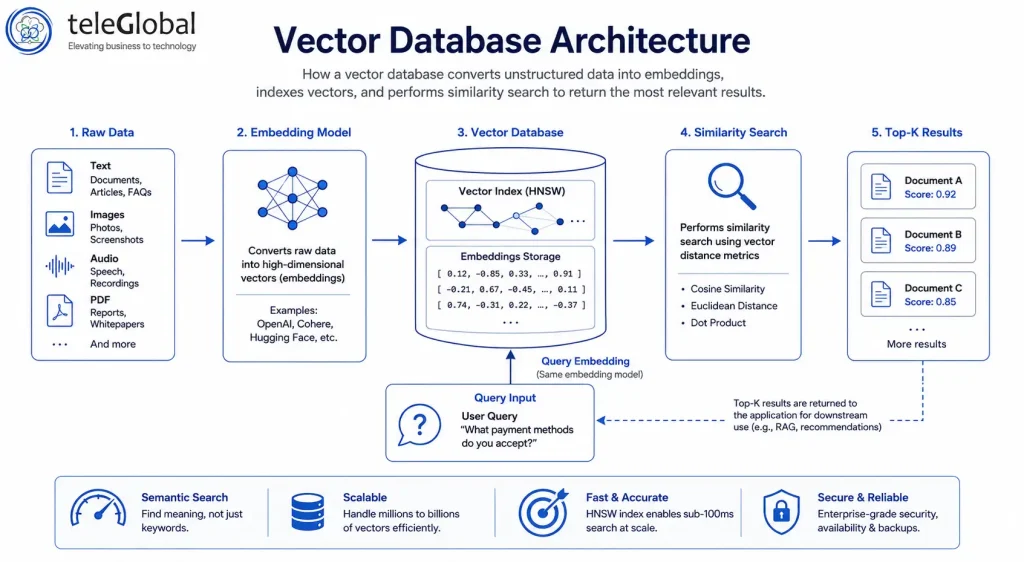
A vector database processes queries through five distinct stages. To understand how this works in practice, consider a vector database example: a user asks ‘What payment methods do you accept?’ and the system retrieves semantically similar documents in milliseconds.
- Data ingestion. Your source data — documents, product descriptions, support tickets, images is passed through an embedding model such as OpenAI text-embedding-3-large, Cohere Embed, or an open-source alternative. The model outputs a vector for each data point.
- Vector storage. The embeddings are stored alongside metadata (document ID, category, date) inside the vector database. Most modern databases store vectors as dense floating-point arrays in a high-dimensional space.
- Index building. The database builds an index to make similarity search fast. The most common algorithm is HNSW (Hierarchical Navigable Small World), a graph-based method that searches from coarse to fine approximations. This allows the database to find the 10 most similar vectors out of 500 million in under 100 milliseconds without comparing every single vector.
- Query processing. When a user submits a question, the database converts that query into a vector using the same embedding model. It then calculates the distance between the query vector and stored vectors using cosine similarity, Euclidean distance, or dot product.
- Result retrieval. The database returns the top-k most similar results — typically 3 to 20 — ranked by relevance score. These results are handed off to the application layer, which may feed them into a language model, display them on screen, or use them to drive a recommendation.
The entire process — from user query to retrieved results — typically completes in under 100 milliseconds, even with hundreds of millions of vectors indexed.
Vector Database vs Traditional Database
Most enterprises already run SQL databases — PostgreSQL, MySQL, or Microsoft SQL Server — for core business operations. These systems are excellent for structured data: orders, invoices, user accounts. They are not designed for the semantic retrieval that AI applications require.
The table below summarizes the core differences so you can make an informed decision about when to use each system.
| Feature | Traditional Database (SQL) | Vector Database | Best For |
| Data Type | Structured rows & columns | High-dimensional numerical vectors | SQL: Forms, transactions; VDB: AI, embeddings |
| Query Method | Exact keyword or value match | Approximate nearest neighbor (ANN) search | SQL: Inventory lookups; VDB: Semantic search |
| Use Case | Billing, CRM, HR systems | RAG pipelines, recommendation engines | SQL: Back-office; VDB: AI applications |
| Search Speed | Fast for exact matches | Milliseconds across billions of vectors | VDB scales better for similarity queries |
| AI Readiness | Not optimized for embeddings | Purpose-built for ML model output | VDB: Any generative AI workflow |
| Setup Complexity | Low (well-known tools) | Medium (new tooling required) | SQL: Quick start; VDB: AI-first teams |
The practical implication is that you do not replace your SQL database with a vector database. The two systems serve different purposes. Most production AI architectures run both: SQL handles structured business logic, while the vector database handles unstructured content retrieval for AI features.
Where Businesses Use Vector Databases
Retrieval-Augmented Generation (RAG)
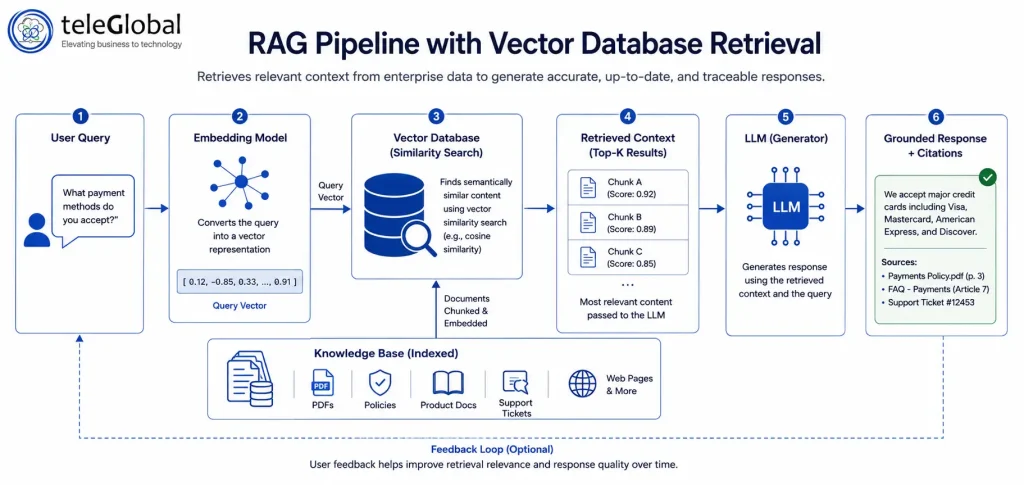
RAG is the most common enterprise use case. Large language models (LLMs) like GPT-4 or Claude are trained on general data and have a knowledge cutoff. They cannot access your internal documents, customer records, or product catalogues without additional infrastructure.
A RAG system fixes this by storing your private knowledge as embeddings in a vector database. When a user asks a question, the system retrieves the most relevant documents from the database and passes them to the LLM as context. The LLM generates a grounded, accurate response based on your actual data rather than its general training. RAG systems reduce AI hallucination rates significantly and keep responses aligned with current information.
Semantic Search
Traditional search engines match keywords. A user searching ‘data center outage planning’ will not find a document titled ‘Server downtime contingency guide’ because the keywords do not overlap. Semantic search powered by a vector database retrieves the document because the meaning is the same.
Enterprises in legal, healthcare, financial services, and manufacturing use semantic search to surface relevant documents, policies, and records from large internal knowledge bases without requiring users to know the exact terminology.
Recommendation Engines
E-commerce platforms, streaming services, and content platforms use vector databases to power recommendations. Each product or piece of content is stored as a vector. When a user interacts with an item, the system finds vectors closest to the user’s preference profile and recommends those items. This approach captures nuanced preference signals that simple category matching misses entirely.
Agentic AI and Long-Term Memory
Agentic AI systems — AI models that autonomously complete multi-step tasks — require persistent memory. A vector database acts as the agent’s external memory store, allowing it to recall past actions, store relevant facts, and retrieve context from previous interactions. This architectural pattern became standard across enterprise AI agent deployments between 2025 and 2026.
Fraud Detection and Anomaly Detection
Financial institutions embed transaction patterns as vectors. Transactions that sit far from any known cluster in vector space are flagged for review. The same principle applies to network security, where unusual traffic patterns stored as vectors can be detected as outliers in near real-time.
Choosing the Right Vector Database
The vector database market has matured considerably. Purpose-built systems and extensions to existing databases now serve different requirements. The table below provides a concise framework for comparing the leading options in 2026.
| Database | Type | Best For | Scale | Hybrid Search | Open Source |
| Pinecone | Managed SaaS | Fast production RAG | Billions of vectors | Yes | No |
| Weaviate | Open source / Cloud | Hybrid search + filtering | Up to 1 trillion objects | Yes (native) | Yes |
| Milvus / Zilliz | Open source / Managed | Enterprise-scale, customizable | Billion-scale distributed | Yes | Yes |
| Qdrant | Open source / Cloud | High performance, Rust-based | Hundred million+ | Yes | Yes |
| pgvector (PostgreSQL) | Extension | Teams on existing PostgreSQL | Moderate (50M vectors) | Partial | Yes |
| ChromaDB | Open source | Local dev, prototyping | Small to medium | No | Yes |
For teams building their first AI application, Pinecone vector database offers the fastest path from idea to production with its fully managed architecture. Teams with existing PostgreSQL infrastructure can add pgvector to get vector search without introducing new tooling, though this option is best suited for datasets under 50 million vectors. At enterprise scale — hundreds of millions of vectors with custom indexing requirements — Milvus or its managed version Zilliz Cloud provides the most flexibility and throughput.
What to Evaluate Before Choosing a Vector Database
- Scale requirements. Estimate your vector count now and in 12 months. Purpose-built systems (Pinecone, Milvus, Weaviate) handle billions of vectors reliably. Extensions like pgvector perform well at moderate scale.
- Hybrid search support. If your application needs to combine vector similarity with structured filters (e.g., ‘find documents similar to this query that were also created after January 2025’), choose a database with native hybrid search — Weaviate and Qdrant both support this well.
- Infrastructure ownership. Managed services like Pinecone eliminate operational overhead. Open source vector database options like Milvus and Qdrant give full data control and reduce long-term cost at scale.
- Embedding model integration. Check whether the database integrates natively with your preferred embedding provider (OpenAI, Cohere, Hugging Face). Weaviate supports automatic vectorization through integrated providers.
- Latency requirements. For real-time user-facing applications, target P99 latency under 100ms. Benchmark your specific workload — published numbers from vendors are measured under controlled conditions that may differ from your use case.
How Teleglobal Helps You Build AI-Ready Data Infrastructure
Teleglobal International has spent over 10 years helping enterprises across India, the US, UAE, and Europe build scalable data and cloud infrastructure. With 900+ clients served and AWS Generative AI partner status, our teams design and implement AI architectures that include vector database selection, embedding pipeline setup, and RAG system deployment.
Our work spans the full stack: from cloud consulting and database management to purpose-built AI services. This includes AWS vector database deployments using Amazon OpenSearch and Kendra, integrated with Bedrock for end-to-end RAG pipelines. We help you choose the right vector database for your workload, integrate it with your existing data stack, and build the retrieval pipelines your AI applications depend on.
Ready to build a production AI system on a solid data foundation? Talk to our team.
Frequently Asked Questions
1. What is a vector database?
A vector database stores data as high-dimensional numerical vectors called embeddings and retrieves results by measuring mathematical similarity between vectors. This allows AI applications to find semantically related content — text, images, or audio — even when the exact words or pixels differ. It is the storage layer that makes semantic search, RAG systems, and AI recommendations possible.
2. What is the difference between a vector database and a regular database?
A regular SQL database stores structured data in rows and columns and retrieves results using exact-match queries. A vector database stores numerical embeddings and retrieves results based on semantic similarity. SQL is ideal for transactions and business records. A vector database is built for AI workloads where meaning matters more than exact values.
3. What is a vector database used for?
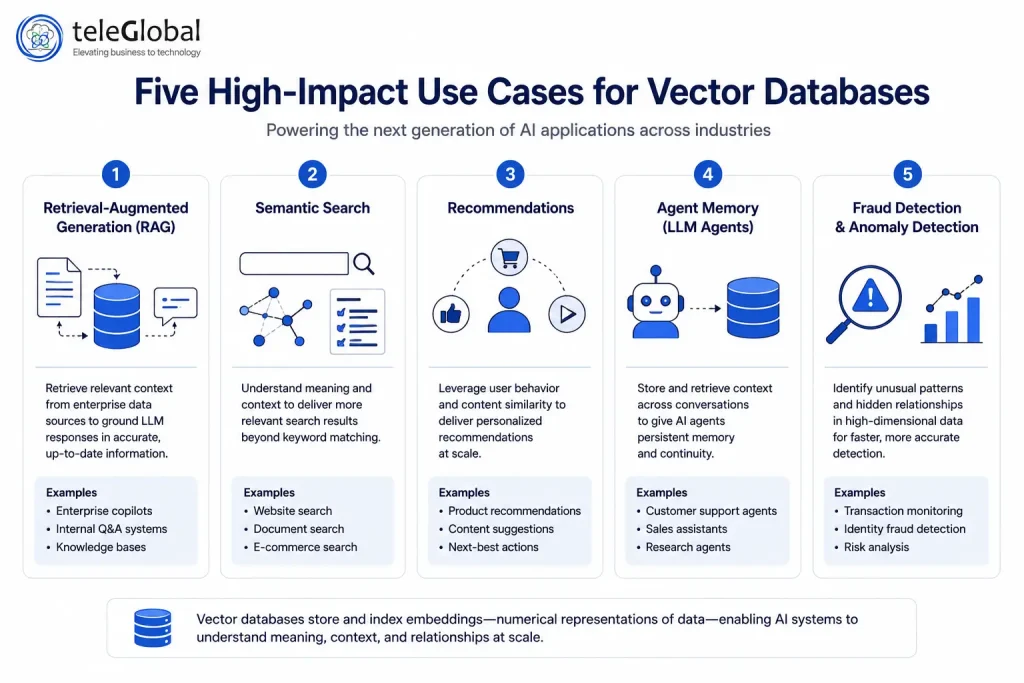
Vector databases power five primary enterprise use cases: retrieval-augmented generation (RAG) for AI chatbots, semantic search across internal documents, product and content recommendation engines, long-term memory for AI agents, and anomaly or fraud detection. Any AI system that must retrieve relevant context from a large dataset relies on a vector database.
4. Do I need a vector database for RAG?
Yes. RAG systems work by retrieving relevant document chunks from a knowledge base and passing them to a language model as context. A vector database is the component that stores those document embeddings and retrieves the closest matches when a query arrives. Without a vector database, a RAG system cannot scale beyond a few dozen documents without unacceptable latency. Teams on Microsoft infrastructure can address this with an Azure vector database through Azure AI Search, which supports native vector indexing.
5. What is the best vector database in 2026?
The best vector database depends on your scale and requirements. Pinecone is the easiest fully managed option for fast production deployment. Weaviate excels at hybrid search combining vector and keyword filtering. Milvus suits large-scale enterprise workloads above 500 million vectors. For teams already on PostgreSQL with under 50 million vectors, pgvector is the lowest-friction starting point.
6. Is MongoDB a vector database?
MongoDB is not a purpose-built vector database, but it added native vector search support through Atlas Vector Search. It stores vectors alongside regular documents and supports approximate nearest neighbor queries. It is a practical option for teams already using MongoDB who want to add vector search without introducing new infrastructure, though it is not optimized for pure vector workloads at very large scale.
7. How does a vector database store data?
A vector database stores each data record as a dense array of floating-point numbers, typically between 384 and 3,072 dimensions depending on the embedding model used. Alongside each vector, the database stores metadata such as document IDs, categories, and timestamps. It builds an index over these vectors using algorithms like HNSW or IVF to enable fast similarity lookups at query time.
8. What is the difference between a vector database and a graph database?
A vector database retrieves data based on mathematical similarity between numerical embeddings. A graph database stores and queries relationships between entities using nodes and edges. In practice, 2026 architectures increasingly combine both: graph-enhanced vector retrieval uses relationship context to improve the accuracy of semantic search beyond what pure vector similarity delivers on its own.