| Author: Ashish Kumar | Published: 21-Sep-2021 |
If your organization is still running Microsoft SQL Server, SharePoint, Exchange, or Windows Server on-premises or on legacy infrastructure, the cost of standing still is rising every quarter, in licensing, hardware refresh cycles, and slower time-to-market for new features.
Migrating Microsoft workloads to AWS isn’t just a cost-cutting exercise. It’s a decision that directly impacts uptime, security posture, compliance readiness, and how fast your teams can ship. This guide breaks down the business case, the technical path, and what to evaluate before you commit.
Ready to see the numbers for your environment? Request a Microsoft Workloads Assessment →
Why CIOs and CTOs Are Prioritizing This Migration Now
Education, public sector, and nonprofit organizations were early movers here, largely driven by budget pressure. But the benefits extend to any enterprise running Microsoft-based infrastructure at scale:
- Reduced backup and recovery windows – organizations running Microsoft SQL Server on Amazon EC2 report significantly faster backup times to the cloud, at a lower cost than traditional backup infrastructure.
- Higher application availability – clustering SQL Server databases across multiple AWS Availability Zones removes single points of failure that plague on-premises setups.
- Lower total cost of ownership – eliminating hardware refresh cycles and rightsizing compute against actual demand, instead of provisioning for peak capacity year-round.
Migrating Core Microsoft Applications: What’s Actually Involved
Database tier: SQL Server workloads move to Amazon EC2, with Amazon EBS providing durable storage and Availability Zone clustering for resilience.
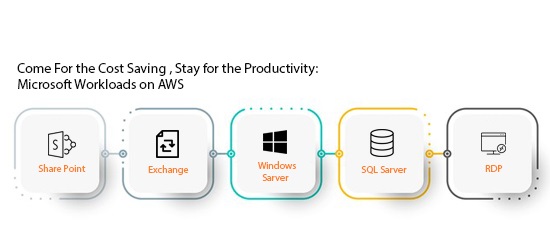
Content and collaboration tier: SharePoint, Exchange, and Windows Server can run together on AWS infrastructure. Static content and media move to Amazon S3, with Amazon CloudFront handling global content delivery, critical if you have distributed teams or customers.
Identity and access: Existing Microsoft Active Directory integrates directly with Amazon Virtual Private Cloud (VPC), so you’re not rebuilding your identity layer from scratch.
Licensing: Using AWS EC2 Dedicated Instances, enterprises can bring their own SQL Server licenses to AWS (License Mobility) and stay fully compliant with Microsoft’s terms of use, a common blocker CIOs flag before migration, resolved without a licensing overhaul.
Compliance: The Question Every Decision-Maker Asks First
Before signing off, most CIOs and CTOs want a straight answer on compliance. AWS holds accreditations including:
- FedRAMP (Federal Risk and Authorization Management Program)
- ITAR (International Traffic in Arms Regulations)
- SOC reporting
- ISO 27001
This isn’t a checkbox exercise, it directly affects whether your legal and security teams will approve the migration, and how quickly you can tell your own customers their data is protected.
Proof It Works: IATA’s Migration
The International Air Transport Association (IATA) needed to boost performance of its business intelligence platform without compromising data confidentiality. AWS’s ISO 27001 certification cleared that bar.
After migrating its BI platform, IATA built a new intranet on AWS running Microsoft SharePoint 2013 with NewsGator/Sitrion for social collaboration, all hosted on Amazon VPC and fully integrated with their existing Active Directory.
The result: IATA now ingests terabytes of data without prior capacity planning and processes it fast, a capability their previous infrastructure couldn’t deliver at the same cost or speed.
AWS vs. On-Premises: What Changes
| Factor | On-Premises / Legacy | Microsoft Workloads on AWS |
|---|---|---|
| Backup speed | Slower, hardware-bound | Significantly faster |
| Scaling | Manual capacity planning | On-demand, no pre-provisioning |
| Availability | Single-site risk | Multi-AZ clustering |
| Licensing | Often locked to hardware | License Mobility to EC2 Dedicated Instances |
| Compliance | Self-managed, costly to certify | Inherits AWS’s FedRAMP, ITAR, SOC, ISO 27001 |
| New feature velocity | Slower release cycles | Faster, cost-effective releases |
What This Means for Your Roadmap
If cost is the trigger for evaluating this migration, treat it as the entry point, not the finish line. The organizations getting the most value are the ones that use the migration to also fix availability gaps, simplify licensing compliance, and build a platform that can absorb the next five years of application growth without another re-architecture.
Next Step
Every environment is different, the right migration path depends on your current Microsoft footprint, compliance requirements, and growth plans.
Talk to an AWS Migration Specialist →
Frequently Asked Questions
Can you run Microsoft SQL Server on AWS?
Yes. Microsoft SQL Server runs on Amazon EC2 instances, with Amazon EBS providing storage and support for clustering databases across multiple Availability Zones for higher availability.
Can I bring my own SQL Server license to AWS?
Yes, through AWS’s License Mobility program. Using Amazon EC2 Dedicated Instances, organizations can bring existing SQL Server licenses to AWS while staying compliant with Microsoft’s licensing terms, avoiding the cost of purchasing new licenses.
Is AWS compliant with FedRAMP, ITAR, and SOC standards?
Yes. AWS holds accreditations including FedRAMP (Federal Risk and Authorization Management Program), ITAR (International Traffic in Arms Regulations), SOC reporting, and ISO 27001 certification, making it suitable for regulated industries and government-adjacent workloads.
Can SharePoint and Exchange run on AWS together with other Microsoft applications?
Yes. SharePoint, Exchange, Windows Server, SQL Server, and Remote Desktop Protocol (RDP) can all run together on AWS infrastructure, with static content served through Amazon S3 and Amazon CloudFront for global delivery.
Does migrating Microsoft workloads to AWS require rebuilding Active Directory?
No. Existing Microsoft Active Directory integrates directly with Amazon Virtual Private Cloud (VPC), so identity and access management carries over without a rebuild.
What is the main cost benefit of moving Microsoft workloads to AWS?
Organizations avoid ongoing hardware refresh cycles and pay only for the compute and storage they use, rather than provisioning infrastructure for peak capacity year-round. Backup times to the cloud are also significantly faster and less costly than traditional on-premises backup infrastructure.
What organizations have successfully migrated Microsoft workloads to AWS?
The International Air Transport Association (IATA) migrated its business intelligence platform to AWS and built a new intranet running Microsoft SharePoint 2013, integrated with Active Directory via Amazon VPC, enabling it to process terabytes of data without prior capacity planning.