This guide explains what Microsoft Entra ID is, how its Single Sign-On capability works, and why enterprise applications should stop managing password storage entirely. It is written for CTOs, IT architects, and senior decision-makers evaluating Microsoft identity management in 2026. You will walk away understanding the OAuth 2.0 authentication flow, how Entra ID P1 and P2 licensing differ, what Conditional Access and passwordless authentication do, and how to evaluate an integration for your application stack.
| Author: Kamlesh Kumar | Published: 06-July-2026 |
Most enterprise data breaches start with a credential leak from an application database. A developer built an authentication system, stored password hashes, one compromised server followed and thousands of user accounts were exposed. Microsoft Entra ID SSO eliminates that attack surface by removing passwords from your application’s responsibility entirely. Your app never receives, stores, or verifies a user’s credential. Microsoft handles all of it.
For any organization already running Microsoft 365, Entra ID SSO is the fastest path to enterprise-grade identity security. Users sign in with their existing Microsoft account. Your application receives a signed, time-limited token. The entire authentication stack – MFA enforcement, brute-force protection, audit logging, password reset, runs on Microsoft’s infrastructure at no additional development cost.
This guide covers how Microsoft Entra ID SSO works technically, what distinguishes it from legacy Azure Active Directory, how P1 and P2 licensing tiers differ, and what architects need to evaluate before integrating it into an application.
What Is Microsoft Entra ID?
Microsoft Entra ID is Microsoft’s cloud-based Identity and Access Management (IAM) platform. It authenticates users, enforces access policies, and issues cryptographically signed tokens to applications, so your application never stores or processes a password directly. For the official product overview, see Microsoft’s Entra ID documentation.
Entra ID is the identity backbone behind Microsoft 365, Azure Portal, and thousands of enterprise SaaS applications. Every organization with a Microsoft 365 or Azure subscription already has an Entra ID tenant. The free tier is included automatically with any Microsoft cloud subscription at no additional cost.
The platform handles authentication, multi-factor authentication, Conditional Access policy enforcement, audit logging, and token lifecycle management. Your development team contributes zero lines of authentication code.
Microsoft Entra ID vs Azure AD: What Actually Changed
Microsoft Entra ID is the new name for Azure Active Directory (Azure AD), rebranded in 2023 as part of a broader restructuring of Microsoft’s identity product family. The underlying platform, APIs, tenant configurations, and token formats remained unchanged. Existing Azure AD integrations continued working after the rebrand without any migration.
The rebrand reflects Microsoft’s strategy to position identity as a unified product family. Entra now includes Entra External ID for B2B and B2C scenarios, Entra Permissions Management for multi-cloud entitlement control, Entra Verified ID for decentralized credentials, and Entra Agent ID, introduced in 2026 to govern AI agent identities inside enterprise environments.
For IT teams: tenant configurations, PowerShell scripts, and API integrations that worked under Azure AD continue to work under Microsoft Entra ID. The transition was a rebrand, not a rebuild.
How Microsoft Entra ID Single Sign-On Works
Single Sign-On means a user authenticates once and gains access to every connected application without re-entering credentials. Microsoft Entra ID acts as the identity provider: it verifies the user’s identity and asserts it to each application through a cryptographically signed token.
Entra ID supports three SSO protocols. OpenID Connect (OIDC) and OAuth 2.0 serve modern web and mobile applications. SAML 2.0 serves established enterprise systems and legacy SaaS platforms. The authentication decisions are identical across all three – only the token format differs. Microsoft documents both standards in OAuth 2.0 and OpenID Connect protocols on the Microsoft identity platform.
The OAuth 2.0 Authorization Code Flow: Step by Step
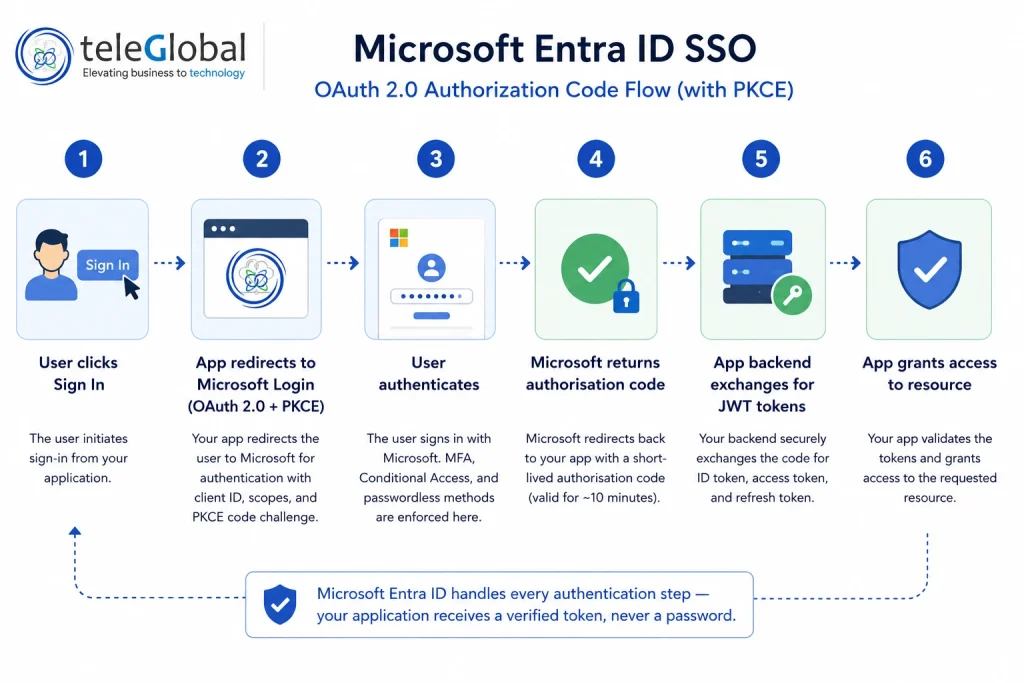
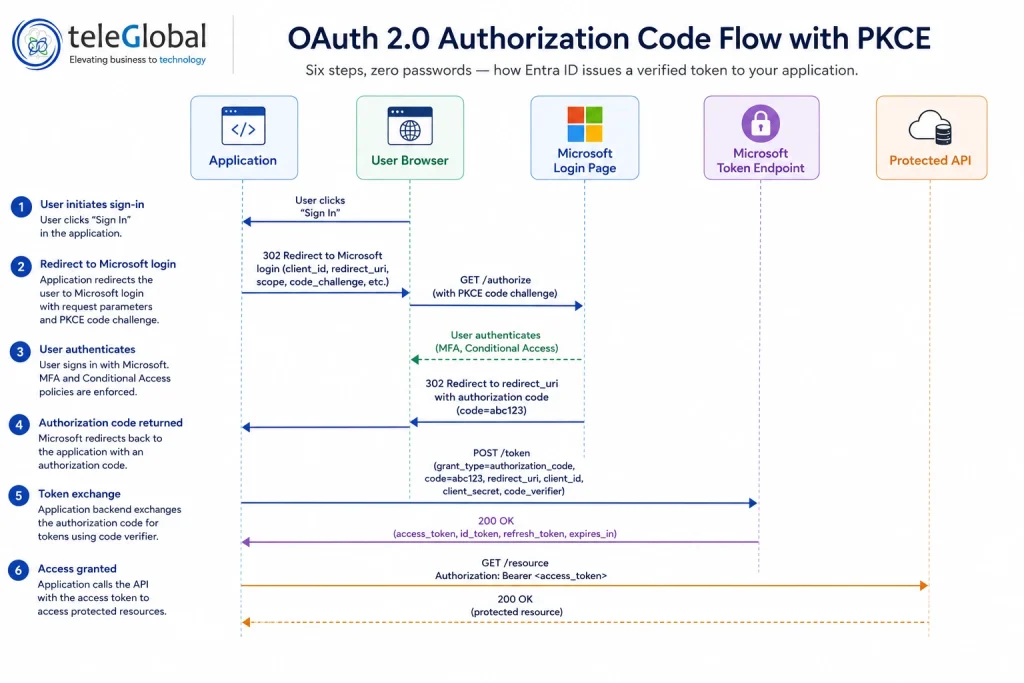
Microsoft Entra ID implements the OAuth 2.0 Authorization Code Flow with PKCE (Proof Key for Code Exchange) for all modern application types. This is the industry-standard protocol defined in RFC 6749. Here is how it works in practice:
- Redirect to Microsoft login. Your application redirects the user to Microsoft’s login page, passing your client ID, requested permission scopes, and a PKCE code challenge. Your application never builds a login form or receives credentials.
- User authenticates with Microsoft. The user signs in on Microsoft’s own page. Your application receives nothing at this stage. Microsoft enforces MFA, evaluates Conditional Access policies, and handles passwordless methods here.
- Authorisation code returned. Microsoft redirects back to your application with a short-lived authorisation code, valid for approximately 10 minutes.
- Token exchange at backend. Your application’s backend exchanges this code at Microsoft’s token endpoint, sending the code along with your client secret and the PKCE code verifier.
- Three tokens issued. Microsoft returns: an access token (valid 60 to 90 minutes) for calling protected APIs; a refresh token (valid up to 90 days on a rolling window) for silent renewal; and an ID token — a JSON Web Token (JWT) containing the user’s name, email, and object ID.
- Access protected resources. Your application includes the access token in the Authorization: Bearer header for every API call. No password. No session to maintain. No credentials to store.
Your application receives a cryptographically signed JSON Web Token. It never touches a password. Microsoft handles every hard part.
What Your Application Gains from Microsoft Entra ID SSO
The table below shows what your development team no longer needs to build, maintain, or secure once Microsoft Entra ID SSO is integrated.
| Capability | Without Entra ID SSO | With Microsoft Entra ID SSO |
| Password storage | App database stores hashed passwords – breach risk present | App never receives or stores a password |
| Authentication logic | Dev team writes and maintains custom auth code | Zero auth development required – inherited from Microsoft |
| MFA enforcement | Custom MFA implementation required | Inherited from organisation policy – zero dev effort |
| Brute-force protection | Custom Smart Lockout logic required | Built-in Smart Lockout – automatic |
| Password reset | Custom self-service flow required | SSPR (Self-Service Password Reset) – Microsoft handles it |
| Audit logging | Custom implementation per sign-in event | Every authentication event logged automatically by Microsoft |
| Compliance evidence | Manual export of custom auth logs | SOC 2, ISO 27001, GDPR audit trails built in |
| Token security | Custom RS256 signing and validation logic | Handled by Microsoft – automatic key rotation included |
| User provisioning | Manual or custom API integration | SCIM automated provisioning – industry standard |
Not sure how much authentication work you could eliminate?
A Teleglobal architect can map your current auth stack against Entra ID SSO in a 30-minute call — no commitment required.
Talk to an Azure ArchitectMicrosoft Entra ID Features That Matter for Enterprise Applications
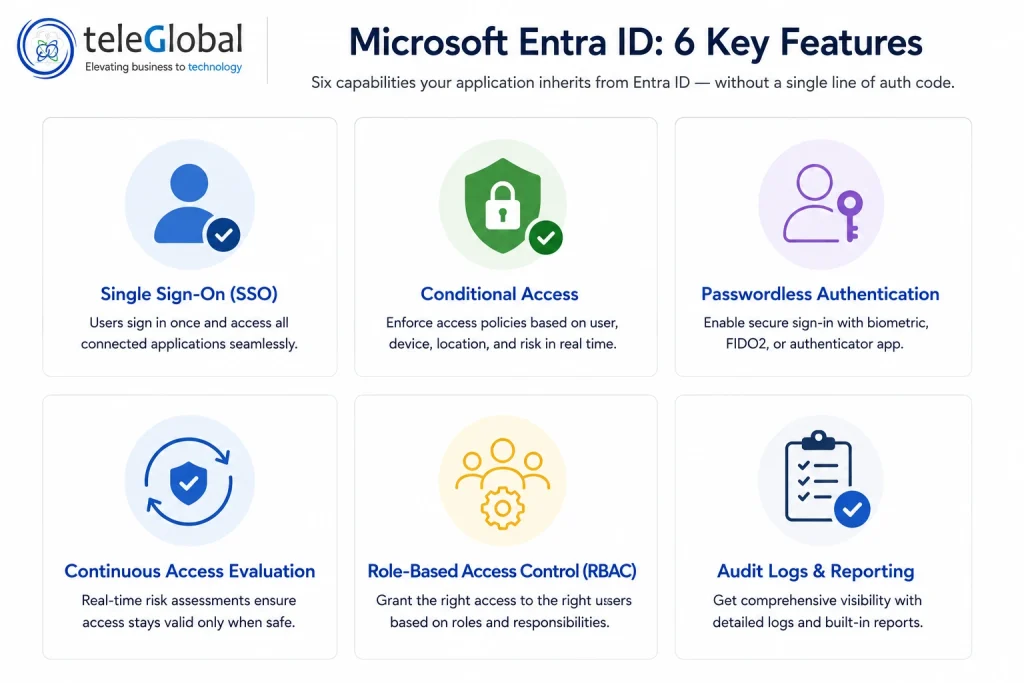
Microsoft Entra ID includes a broad set of identity capabilities. The following are the features most relevant to enterprise architects and security teams evaluating an SSO integration.
Conditional Access
Conditional Access is a policy engine that evaluates identity, device compliance, location, and sign-in risk before granting access to any application. A policy can require MFA for users signing in outside corporate IP ranges, block access from non-compliant devices, or enforce stricter controls for sensitive applications. These policies apply across every application connected to the Entra ID tenant – the application itself implements none of this logic.
What this means for your business: A single policy change in the Entra admin portal updates access controls across every connected application instantly – no code deployments, no maintenance windows.
Passwordless Authentication
Microsoft Entra ID supports fully passwordless sign-in through four methods. Microsoft Authenticator uses push notifications with number matching and biometric or PIN approval on the user’s phone. FIDO2 security keys are hardware tokens (USB or NFC) that are phishing-resistant by design, a credential stuffing attack cannot compromise them. Windows Hello for Business uses biometric authentication or a device PIN tied cryptographically to the user’s machine. Certificate-based authentication uses X.509 certificates for high-security environments.
In June 2026, Microsoft made passkey registration campaigns generally available – IT administrators can now prompt users at scale to register passkeys during sign-in, without manual enrolment. Your application implements none of this. Organisations enable passwordless at the tenant level and every connected application inherits the capability automatically.
Continuous Access Evaluation (CAE)
Standard OAuth 2.0 access tokens expire on a fixed schedule – typically 60 to 90 minutes. A compromised token can be used until natural expiry. CAE changes this: when a critical security event occurs (a password change, account disable, or admin revocation), Microsoft revokes the token in near-real-time rather than waiting for the expiry clock. The result is a significantly smaller exposure window if a token is ever compromised.
Role-Based Access Control via Token Claims
Enterprise applications need to differentiate what users can do based on their role. With Entra ID, roles are defined in the application’s App Registration. For example: Admin, Editor, Viewer. Users are assigned those roles in the tenant admin portal. The role appears directly in the access token as a claim. The application backend reads the role from the token and enforces permissions. No additional database call, no custom role management system, no separate synchronisation job.
Audit and Sign-In Logs
Every authentication event successful sign-ins, failed attempts, MFA challenges, Conditional Access evaluations, risk score changes is automatically logged with IP address, device information, location, and risk score. For organisations subject to SOC 2, ISO 27001, or GDPR requirements, this provides a complete audit trail without any custom logging implementation.
Microsoft Entra ID Pricing: Free, P1, P2, and the Entra Suite
Microsoft Entra ID Free is included with every Microsoft 365 and Azure subscription. It supports unlimited SSO across SaaS applications, standard MFA, self-service password reset for cloud-only users, and basic user and group management. For organisations already on Microsoft 365, no additional purchase is required to start using Entra ID SSO.
| Feature | Entra ID Free | P1 — $6/user/month | P2 — $9/user/month |
| Single Sign-On (SSO) | Unlimited apps | Unlimited apps | Unlimited apps |
| Multi-Factor Authentication | Security defaults | Granular MFA per policy | Granular MFA per policy |
| Conditional Access | Not included | Included | Included |
| SSPR with on-premises write-back | Cloud users only | Included | Included |
| Application Proxy (on-prem apps) | Not included | Included | Included |
| Risk-Based Conditional Access | Not included | Not included | Included |
| Identity Protection (anomaly detection) | Not included | Not included | Included |
| Privileged Identity Management (PIM) | Not included | Not included | Included |
| Access Reviews | Not included | Not included | Included |
| Microsoft 365 bundle | All M365 plans | E3, Business Premium, F1 | E5, Defender Suite |
The Microsoft Entra Suite, at $12 per user per month, bundles Entra Internet Access, Private Access, ID Governance, and Verified ID premium features into a single licence. It represents Microsoft’s integrated approach to Secure Service Edge (SSE) architecture and is included in Microsoft 365 E7, generally available from May 2026.
P1 vs P2: How to Choose
The choice between P1 and P2 comes down to three questions: whether your organisation needs real-time risk-based access decisions, whether administrators require just-in-time privileged access (PIM), and whether your compliance mandate requires automated access reviews.
| Decision Criteria | Choose Entra ID P1 | Choose Entra ID P2 |
| Organisation size | SMB to mid-market (200 to 1,000 users) | Enterprise or regulated industries (1,000+ users) |
| Compliance requirements | SOC 2, ISO 27001 basic requirements | HIPAA, FedRAMP, FINRA, GDPR deep audit needs |
| Admin privilege exposure | Standard role management acceptable | Just-in-time PIM activation required |
| Sign-in risk monitoring | Not a current priority | Real-time risk scoring essential |
| Microsoft 365 bundle | Already on E3 or Business Premium | Already on E5 or Defender Suite |
| Automated access reviews | Manual review process acceptable | Regulatory or audit-driven recertification required |
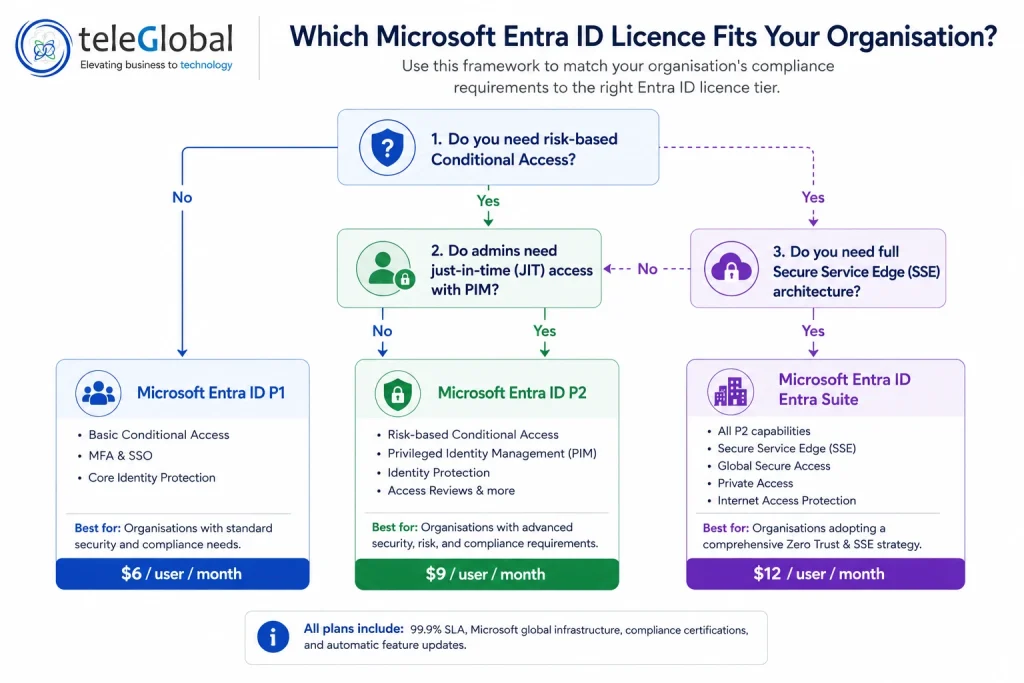
Still deciding between P1 and P2?
Get a free licence audit of your current Microsoft 365 subscription — Teleglobal will tell you exactly what you already have and what you actually need.
Get a Free Licence AuditMicrosoft Entra ID in 2026: Agent Identities and What Comes Next
AI agents deployed inside enterprise environments need governed identities, just like human users. An agent accessing SharePoint, sending emails, or querying databases on a user’s behalf carries real security and compliance risk if its access is ungoverned.
Microsoft introduced Entra Agent ID in 2026 to address this. It extends the Entra ID identity framework to AI agents, giving each agent a governed identity, enforcing least-privilege access, and maintaining a full audit trail of the agent’s actions. For organisations deploying Microsoft 365 Copilot, Azure AI, or any third-party agentic workflow platform, the same Conditional Access policies that apply to human users can now apply to AI agents. Entra Agent ID is available to all Microsoft Entra customers at no additional cost beyond the existing licence tier.
How to Evaluate Entra ID Integration for Your Application
Before committing to a Microsoft Entra ID integration, enterprise architects should work through five evaluation areas, whether the application is net-new or migrating from a custom authentication system.
- Protocol compatibility. Confirm whether your application stack supports OpenID Connect, OAuth 2.0, or SAML 2.0. Modern frameworks (Node.js, .NET, Python, Java, Go) have mature MSAL library support maintained by Microsoft. Legacy applications may require SAML or Application Proxy.
- Tenant type selection. A single-tenant integration authenticates users from one specific Microsoft 365 organisation, the most common setup for internal enterprise applications. A multi-tenant integration allows users from any Microsoft Entra tenant to sign in, used for SaaS products serving multiple customer organisations. The choice affects App Registration configuration and token security scope.
- Licence coverage check. Verify which Entra ID tier your organisation already holds through its Microsoft 365 subscription. Microsoft 365 E3 includes P1. Microsoft 365 E5 includes P2. Office 365 plans include the Free tier only. No additional purchase may be needed.
- Conditional Access requirements. Identify which access control policies your security team needs to enforce. Standard location-based and device-based policies require P1. Risk-based policies that adjust access based on real-time sign-in risk signals require P2.
- On-premises application coverage. Applications hosted on-premises can use Entra ID SSO through Microsoft Entra Application Proxy, which publishes internal apps for secure remote access without a VPN. Application Proxy requires P1 or P2.
Evaluating Entra ID for a hybrid or multi-app environment?
Teleglobal has deployed Entra ID SSO across 900+ organisations, including complex hybrid AD and multi-tenant setups. Let’s assess your specific integration path.
Book Your Integration AssessmentWhy Enterprises Work With Teleglobal on Microsoft Entra ID Deployments
Teleglobal International is a Microsoft Azure Advanced Partner with 10 years of experience deploying enterprise cloud and identity solutions across 900+ organisations in more than 20 countries. The team includes certified Azure architects and engineers with hands-on implementation experience across Microsoft Azure Services, Microsoft 365 environments, and hybrid on-premises and cloud infrastructures.
Entra ID deployments vary significantly in complexity depending on what is already in place. Organisations with hybrid Active Directory environments, multiple application portfolios, or strict compliance mandates (particularly in BFSI, healthcare, and manufacturing) require a structured approach to tenant configuration, Conditional Access policy design, application registration architecture, and licence optimisation.
Teleglobal clients across India, the UAE, the US, and Europe have deployed Entra ID SSO as part of broader Azure and Microsoft 365 engagements. A typical engagement includes an identity posture assessment, Conditional Access policy design matched to compliance requirements, application integration across the M365 stack, and ongoing monitoring through Azure’s sign-in logs and Identity Protection reports.
Ready to evaluate Microsoft Entra ID for your organisation? Book a 30-minute call with a Teleglobal Azure architect. We start with your current identity posture and work backwards from there.
Frequently Asked Questions
1. What is Microsoft Entra ID?
Microsoft Entra ID is Microsoft’s cloud-based Identity and Access Management platform. It authenticates users, enforces access policies, and issues signed tokens to applications, so your application never stores or processes passwords. It is the identity backbone of Microsoft 365, Azure, and thousands of enterprise SaaS applications, formerly known as Azure Active Directory.
2. How is Microsoft Entra ID different from Azure Active Directory?
Microsoft Entra ID is the new name for Azure Active Directory (Azure AD), rebranded by Microsoft in 2023. The platform, APIs, and features are identical. Existing Azure AD integrations continued working after the rebrand without any migration. The new name reflects Microsoft’s strategy to unify its identity products under the broader Entra family, which now includes Entra External ID, Entra Permissions Management, and Entra Agent ID.
3. Is Microsoft Entra ID free?
The Free tier is included with every Microsoft 365 and Azure subscription at no additional cost. It supports unlimited SSO across SaaS applications and standard MFA. Advanced features LIKE Conditional Access, Privileged Identity Management (PIM), and risk-based access controls require P1 at $6 per user per month or P2 at $9 per user per month.
4. What is the difference between Microsoft Entra ID P1 and P2?
P1 includes Conditional Access, unlimited SSO, self-service password reset with on-premises write-back, and hybrid identity support via Application Proxy. P2 adds Identity Protection with real-time risk-based Conditional Access, Privileged Identity Management (PIM) for just-in-time admin access, and automated access reviews for compliance. P1 is included in Microsoft 365 E3; P2 is included in Microsoft 365 E5.
5. Does Microsoft Entra ID support passwordless authentication?
Yes. Entra ID supports four passwordless methods: Microsoft Authenticator (push notification with number matching), FIDO2 hardware security keys (phishing-resistant by design), Windows Hello for Business (biometric or device PIN), and certificate-based authentication. Organisations enable passwordless at the tenant level and every connected application inherits the capability automatically, no changes to application code required.
6. What is Conditional Access in Microsoft Entra ID?
Conditional Access is a policy engine inside Entra ID that evaluates identity, device compliance, location, and sign-in risk before granting access to any application. Administrators define rules. For example, requiring MFA for users outside the corporate network and those rules apply across every Entra ID-connected application automatically. Standard Conditional Access policies require P1; risk-based policies require P2.
7. How does Microsoft Entra ID SSO work technically?
Entra ID implements the OAuth 2.0 Authorization Code Flow with PKCE, as defined in RFC 6749. The user is redirected to Microsoft’s login page. Microsoft authenticates the user, enforces MFA and Conditional Access, and returns a signed JSON Web Token (JWT). The application includes the access token in API calls. The token expires in 60 to 90 minutes; a refresh token silently obtains a new one – no user interaction required.
8. What is the Microsoft Identity Platform?
The Microsoft Identity Platform is the developer-facing layer of Microsoft Entra ID. It includes the authentication endpoints (login.microsoftonline.com), the Microsoft Authentication Library (MSAL) for Node.js, .NET, Python, Java, Go, and other languages, the Microsoft Graph API for accessing M365 data, and documentation for integrating applications using OAuth 2.0, OpenID Connect, and SAML 2.0.