
Summary: Microsoft Azure Storage supports object, file, queue, table and disk data. The best design starts with the workload: data model, access pattern, performance target, security boundary, recovery objective and budget. Select the simplest service and protection model that meets these requirements, then validate the choice with realistic usage and recovery testing.
| Author: Ashish Kumar | Published Date: 23-Oct-2026 |
What Is Azure Storage?
Azure Storage provides managed cloud services for enterprise data. For organisations evaluating architecture, migration or optimisation, Teleglobal’s Microsoft Azure Services outlines consulting, migration, security, managed operations and cost-management support around Azure environments.
The storage portfolio includes Blob, Files, Queue and Table services through storage accounts, while Managed Disks provide persistent block storage for Azure virtual machines. Most enterprises need more than one service because documents, shared files, application messages and VM disks have different access and operating requirements.
Azure Storage Services by Business Requirement
Use this matrix to shortlist a service. The final design should be validated against workload data, not selected from a generic feature comparison.
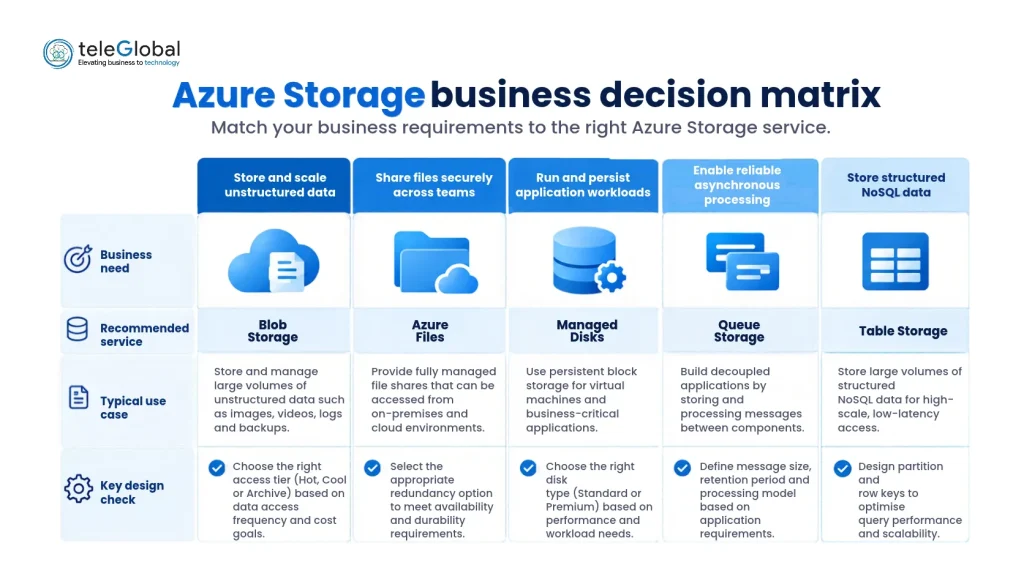
Azure Storage Services by Business Need
| Business need | Recommended service | Why it fits | Key design check |
|---|---|---|---|
| Store documents, media, backups or logs | Blob Storage | Object storage for large volumes of unstructured data | Access tier, retrieval time, retention and lifecycle rules |
| Run shared file workloads | Azure Files | Managed SMB or NFS shares for cloud and hybrid use | Identity, protocol, network path and throughput |
| Provide storage for Azure VMs | Managed Disks | Persistent block storage attached to virtual machines | IOPS, latency, availability, snapshots and backup |
| Decouple application components | Queue Storage | Simple asynchronous messaging between services | Message size, retries, delivery behaviour and scale |
| Store key-value application data | Table Storage | Schemaless storage for predictable key-based access | Partition design, query pattern and transaction needs |
How to Choose the Right Azure Storage Service?
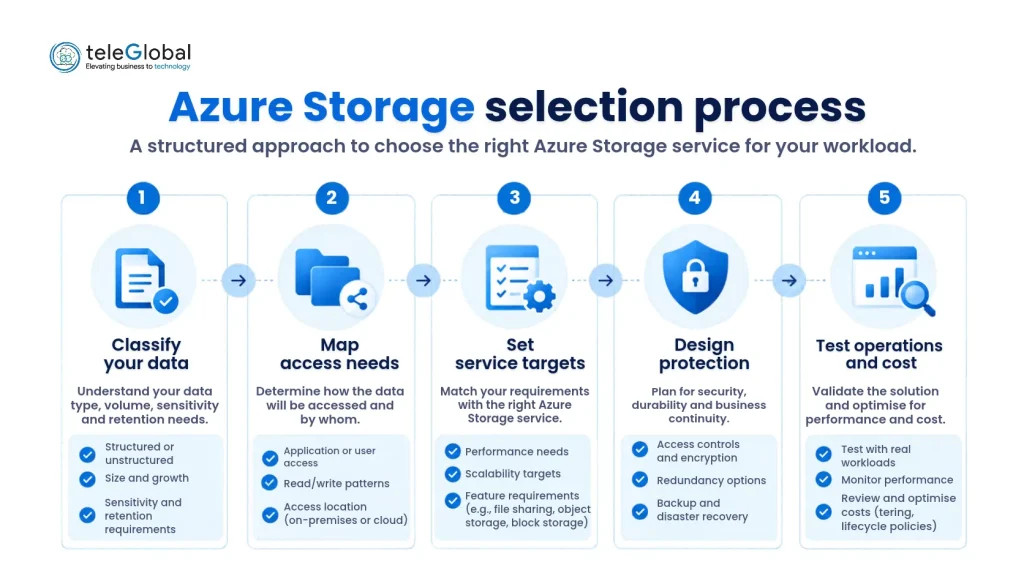
Five-step Azure Storage selection process for enterprise workloads
1. Classify the data – Record format, sensitivity, owner, retention, residency and growth.
2. Map access – Estimate reads, writes, transactions, transfers and retrieval-time requirements.
3. Set service targets – Define latency, throughput, IOPS, downtime and acceptable data loss where relevant.
4. Design protection – Decide identity, permissions, account separation, network controls, backup and recovery.
5. Test operations and cost – Validate performance, monitoring, recovery and spend with representative usage.
Azure Storage Redundancy and Recovery
Azure Storage keeps multiple copies of data. Azure Storage redundancy guidance distinguishes replication within one datacentre, across availability zones, and to a secondary region. Select the option from the outage scenario, recovery objective and cost.
Redundancy is not a complete recovery plan. Teams must also address accidental deletion, corruption, application reconnection, recovery ownership and testing. Separate storage accounts may be appropriate when workloads need different redundancy, security or regional policies.
Azure Storage Security Best Practices
Build security into the storage architecture before migration. Use identity-based access where supported, apply least privilege, limit public exposure and separate workloads with different trust boundaries. Enable relevant logging, monitor configuration changes and select soft delete, versioning, backup or immutability controls according to recovery and retention needs.
For a broader review of identity, network, data-protection and recovery controls, use Azure Storage security guidance as a technical validation source.
Azure Storage Cost Optimisation
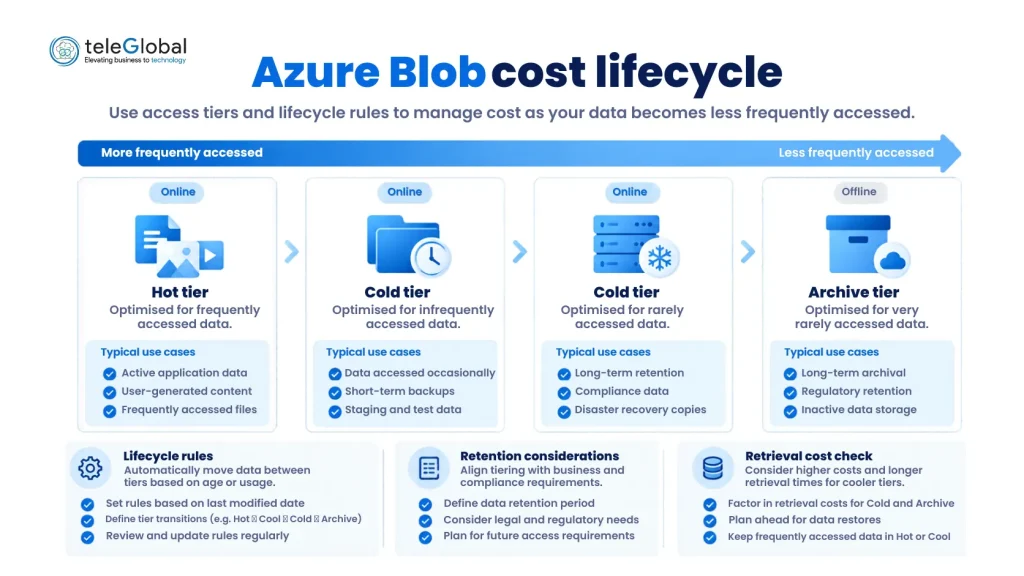
Azure Blob access tiers and lifecycle cost controls
Storage cost includes capacity, transactions, retrieval, data transfer, redundancy and retention. For Blob Storage, choose access tiers from observed usage rather than assumption. Hot suits frequent access; cooler tiers reduce capacity cost but increase access cost; Archive is offline and requires retrieval before use.
Lifecycle rules can move eligible blobs to cooler tiers or delete them when conditions are met. Teleglobal’s cloud cost optimisation services page provides the relevant internal route for organisations that need wider cost-governance support across cloud resources.
Review abandoned snapshots, unattached disks, duplicate data and unnecessary retention. Measure cost against a completed business task, not only price per gigabyte, because retrieval delay and transaction charges can offset a lower storage rate.
Plan Azure Storage with Teleglobal
A well-planned Azure Storage environment should support application performance, data protection, operational resilience and cost control. Speak with Teleglobal’s cloud experts to assess your current storage environment and define a practical migration, modernisation or optimisation plan.
Frequently Asked Questions
1. Is Azure Blob Storage the same as Azure Storage?
No. Blob Storage is one service within the broader Azure Storage portfolio.
2. Which redundancy option is best?
There is no universal choice. Select it from availability, regional-failure, recovery and cost requirements.
3. How can a business reduce Blob Storage costs?
Match access tiers to observed usage, test lifecycle rules and monitor retrieval, transaction and transfer charges.
4.Can Azure Storage support hybrid workloads?
Yes. Azure Files can support managed file-sharing scenarios, subject to identity, connectivity, performance and recovery validation.